SQL editor
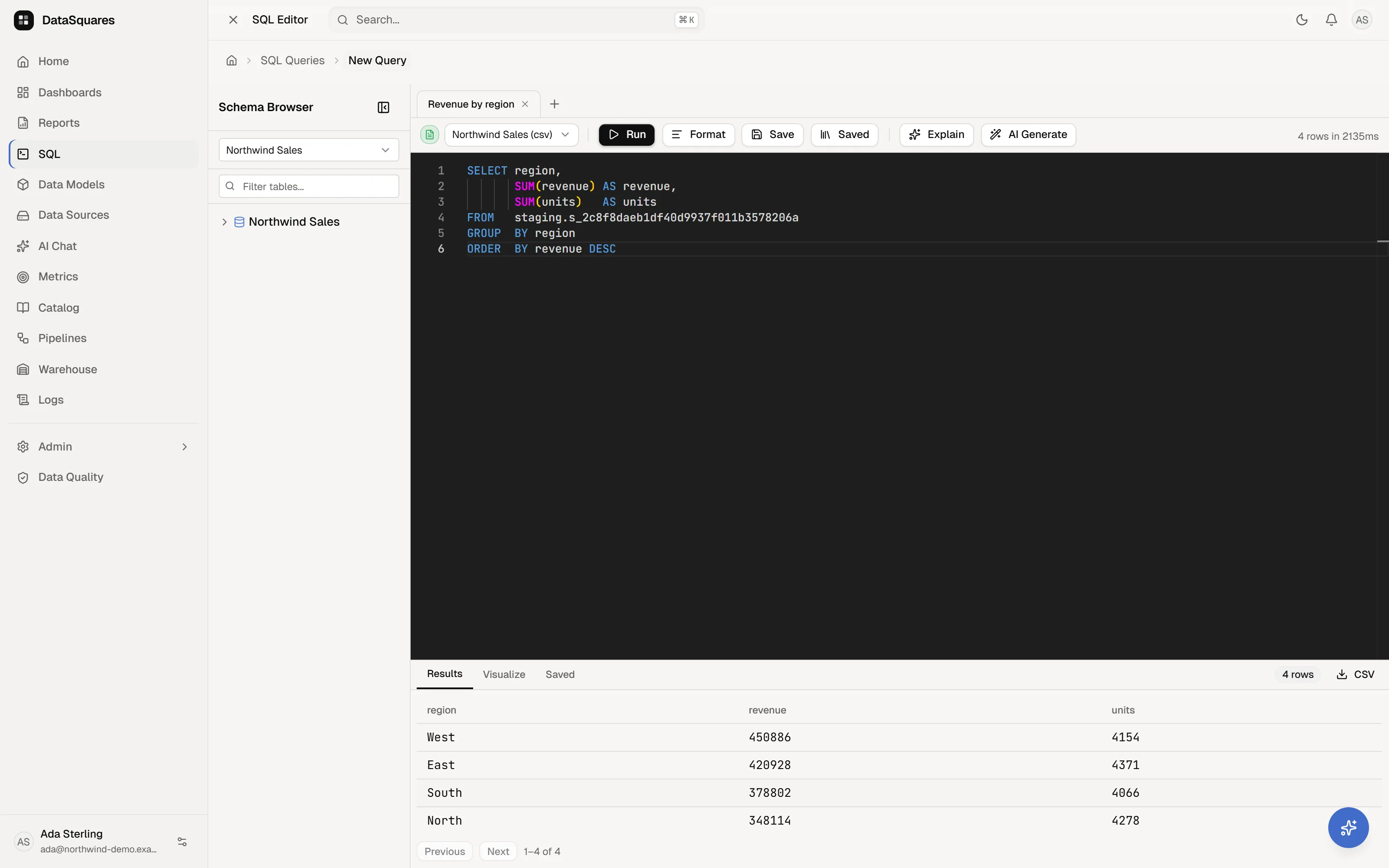
The SQL editor is a full query workspace for when you want to talk to your
data directly. It’s read-only by design: SELECT and WITH statements only.
Prefer not to write SQL? The visual query builder produces the same saved queries from a chain of steps.
Tabs, sources, and drafts
Section titled “Tabs, sources, and drafts”- Per-tab SQL & sources: Work in multiple query tabs (
Query 1,Query 2, …). Each tab maintains its own independent SQL buffer and its own data source binding. Switching tabs restores both the SQL buffer and the source it was configured to run against. - Dirty indicators: Tabs display a dot indicator (
•) whenever they contain unsaved edits compared to their baseline. - Close guards: Closing a tab with unsaved changes prompts a confirmation dialog so work is never lost by an accidental click.
- 7-day draft recovery: Unsaved work across open tabs is automatically persisted in user- and workspace-scoped browser storage. If your browser closes or crashes, returning to the SQL editor restores your tabs with a recovery notification.
- Navigation guards: Navigating away from the editor while tabs have unsaved changes triggers an in-app guard prompting you to stay or discard.
Writing and running
Section titled “Writing and running”- The editor is Monaco-based (the VS Code editor) with SQL keyword auto-completion, keyword casing, and word wrap.
- Format (
Ctrl+Shift+F/⌘+Shift+Fon macOS) formats real clause-aware indentation and keyword capitalization viasql-formatter. - Run (
Ctrl+Enter/⌘+Enteron macOS) executes the statement against the selected source. Tolerates leading comments, parentheses, and CTEs. - Cancel run: Long-running queries can be aborted mid-flight using the Cancel button on the toolbar.
- Execution info: The status bar reports rows returned and execution time (
N rows in N ms), explicitly flagging when results are capped by the server’s row limit. - Deep linking: Links with
/sql/new?q=<id>&run=1open saved queries into clean tabs (or run them immediately) while preserving any in-progress dirty tabs.
The schema browser
Section titled “The schema browser”The collapsible left panel walks Source → Schema → Table → Column (with column data types):
- Click to insert: Click any table or column name to insert it directly into the SQL editor at the current cursor position.
- Search filter: Filter table and column names in real time with the schema search bar.
- Schema discovery: Trigger background schema discovery with live status updates and notifications to refresh metadata after database migrations.
Results, visualization, and export
Section titled “Results, visualization, and export”- Results grid: A paginated table (100 rows per page) with a row-count badge.
- Visualize tab: Built-in visualizer auto-generates charts from categorical and numeric columns in your query result for instant inspection before creating dashboards.
- Saved tab: Browse, search, and run or load queries directly from your workspace library.
- CSV export: Download full query result sets with one click.
AI assistance
Section titled “AI assistance”- Explain: Converts the current SQL query into plain-English documentation.
- AI Generate: Generates SQL from a natural language prompt with interactive preview to accept or reject into the editor.
- Transparent feedback: Surfaces clear status messages for AI quota limits, provider availability, or configuration issues.
Saving queries
Section titled “Saving queries”Save stores queries into the workspace’s saved-query library:
- Save vs. Update in-place: When editing a query opened from the library, choose to update the existing query in-place (updating both its SQL and source binding) or save it as a new query.
- Saved queries can be shared with team members, scheduled, or dropped onto a dashboard as live SQL cards.
Related
Section titled “Related”- Saved queries
- Visual query builder — build the same thing without SQL.
- Connect your data
- Keyboard shortcuts