Governed metrics
A governed metric binds a SquareX expression to a data model with a grain, an optional target, and stewardship metadata — the single source of truth for a KPI. Where a measure lives inside one model, a metric is a workspace-level object: certifiable, evaluable through the API, usable by the AI agent, and bindable to KPI cards.
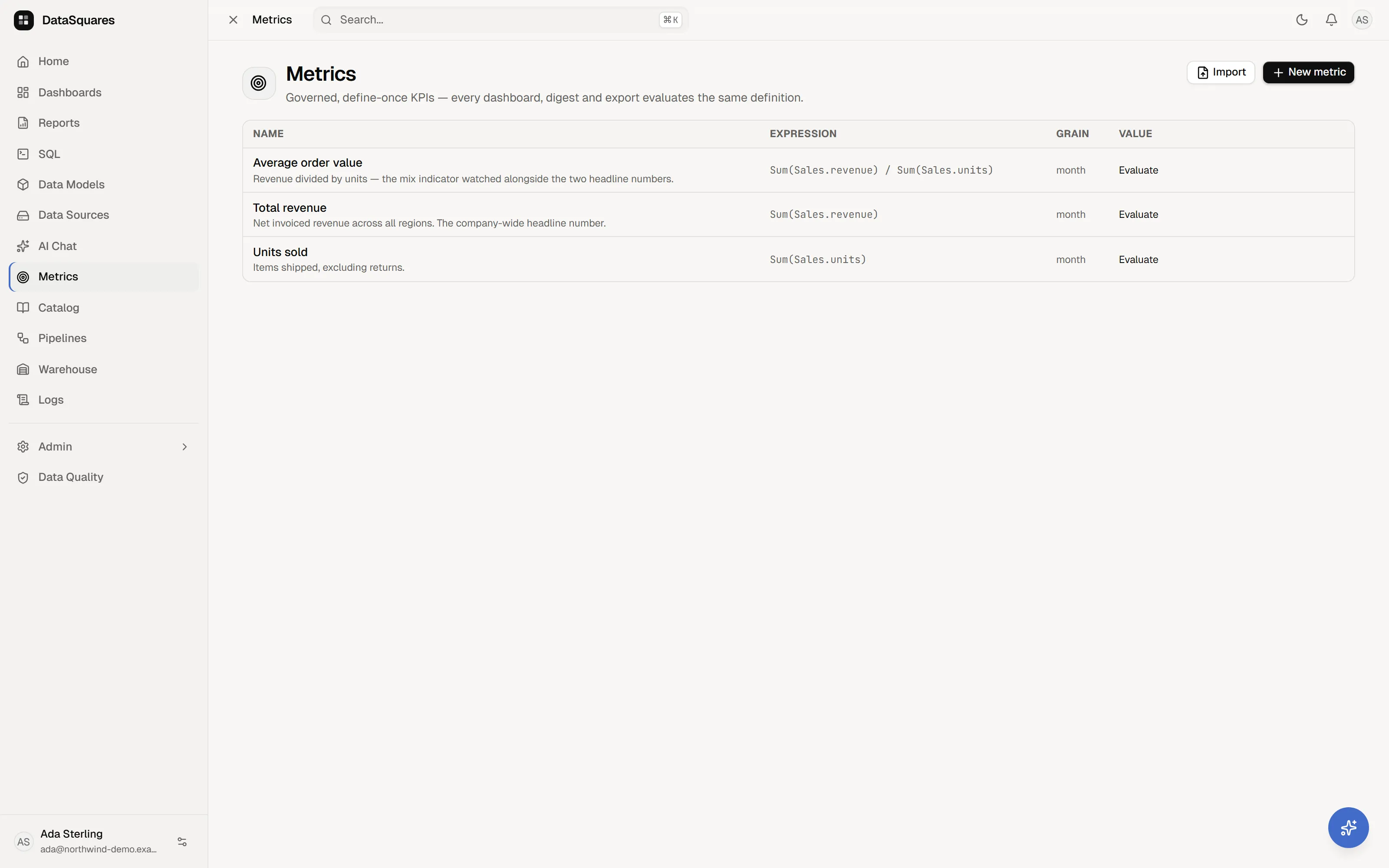
The Metrics hub
Section titled “The Metrics hub”The Metrics page lists every governed metric — name (with its description and any ✓ certified and domain badges), expression, grain, and value. Values are evaluated on demand: click Evaluate on a row; after it loads, use the refresh control to evaluate it again. The current value (and target, if set) is computed live through the governed query pipeline, with your row-level security applied.
Filter by domain, and use Import/Export to move metric definitions between workspaces. Hover a row for Certify/Uncertify, Export, Edit, and Delete. Certification is rejected by the API for non-admins even though the row action is visible.
The list distinguishes failure from an empty workspace. If metrics cannot be loaded, it offers Try again and suppresses the first-metric prompt so a transient error does not encourage a duplicate KPI. The domain control follows the same rule and hides when its own request fails.
Defining a metric
Section titled “Defining a metric”New metric opens the definition dialog:
| Field | Meaning |
|---|---|
| Name / Description | how the metric appears everywhere |
| Data model | the model the expression validates against — pick this first |
| Expression (SquareX) | the definition, with live validation (“✓ valid · number”) |
| Grain | the natural evaluation bucket: day, week, month, quarter, or year |
| Target (optional) | the goal — enables pace-to-target insights |
| Owner | the accountable person |
| Domain | a grouping label (e.g. “Finance”) |
The editor loads model tables, fields and existing measures for SquareX completion. It validates after a short pause and validates again when you save, so an old success result cannot approve expression text that has since changed. Model and owner selectors disable on load failure instead of presenting an empty list; an existing owner or model is preserved when it is no longer in the returned picker data.
Metric reads require dashboard:read; create, edit, delete, import, digest
writes and ownership updates require dashboard:write. The Metrics menu itself
is controlled by the metrics menu permission. Ownership can only be assigned
to a current workspace member;
certification is reserved for admins.
Metric names are unique within a workspace. A duplicate create or rename
returns 409 Conflict. Delete is a soft delete in the API; it removes the
metric from live lists but does not rewrite dashboard definitions that may
still reference its ID.
Metrics on dashboards
Section titled “Metrics on dashboards”A KPI card can bind directly to a metric: in the card’s config panel, Bind to metric replaces the field wells — the card renders the metric’s evaluated value, so every dashboard showing “Monthly Revenue” shows the same Monthly Revenue.
Metrics in the AI agent
Section titled “Metrics in the AI agent”The AI chat agent knows your governed metrics: ask “how is
revenue pacing?” and it answers from the certified definition — via its
list_metrics and evaluate_metric tools — rather than improvising SQL. The
same two tools are exposed to external clients through the
MCP server.
Digests & pace insights
Section titled “Digests & pace insights”Metric digests bundle up to 20 metrics on a daily or weekly schedule and deliver through webhooks — Slack-format hooks get readable channel lines. Metrics with targets carry a pace narrative: “Monthly Revenue is pacing 18% ahead of target — projected $1.4M against the $1.2M goal by month end”, with statuses from achieved through critical. Digests are managed through the Metrics API today (no web UI yet). The API can list, create, delete, and send a digest immediately; there is currently no digest update endpoint. A digest contains at most 20 metrics, defaults to daily and enabled, and schedules its first run one day or one week after creation.
Scheduled runs evaluate with the digest creator’s identity. Send now uses
the caller’s identity because the values are returned in that HTTP response.
That distinction prevents a restricted caller from receiving the creator’s
less-restricted result. One metric failing produces an error entry rather than
dropping the whole digest. A completed run emits digest.sent and creates an
in-product notification for the creator.
Metric-bound alerts
Section titled “Metric-bound alerts”The alerts API accepts a metric-bound condition —
{ metricId, operator, threshold } — that watches a governed metric directly
(the dashboard alert dialog currently creates
field-based rules; metric-bound rules are created via the
Alerts API).
Automatic anomaly sweeps
Section titled “Automatic anomaly sweeps”DataSquares evaluates certified metrics for anomalies in the background, at most once per hour per metric. To qualify, a metric must be model-bound, certified, have a time dimension, and use a day, week, month, or quarter grain. Year-grain metrics and metrics without a time dimension are skipped.
The sweep removes the still-in-progress trailing bucket before evaluating the
latest complete period. It needs enough history (at least eight complete daily
or weekly points, or seven monthly/quarterly points) and deduplicates by metric
and bucket. A firing records alert history, notifies the metric creator, and
emits metric.anomaly_detected. Evaluation uses the creator’s identity, so RLS
is preserved; uncertified metrics are not swept.
API-only metric capabilities
Section titled “API-only metric capabilities”The metric API exposes more fields than the current web editor: stored filters,
a time dimension, warning/critical thresholds, number formatting, and optional
series evaluation. POST /api/metrics/{id}/value accepts ad-hoc filters,
refresh: true, and an optional series window of 30d, 90d, or ytd with
an optional grain. Series require a time dimension and return at most 500
buckets through the same RLS-aware governed query pipeline.
The create API also accepts savedQueryId, but saved-query-bound metric
evaluation is not implemented: the value, digest, alert, anomaly and KPI
paths currently evaluate model-bound metrics only. The web editor therefore
offers data models only. Treat saved-query binding as a storage contract, not a
working evaluation path.
Related
Section titled “Related”- SquareX — the expression language metrics are written in.
- Catalog: certification & glossary
- Metrics API