Saved queries
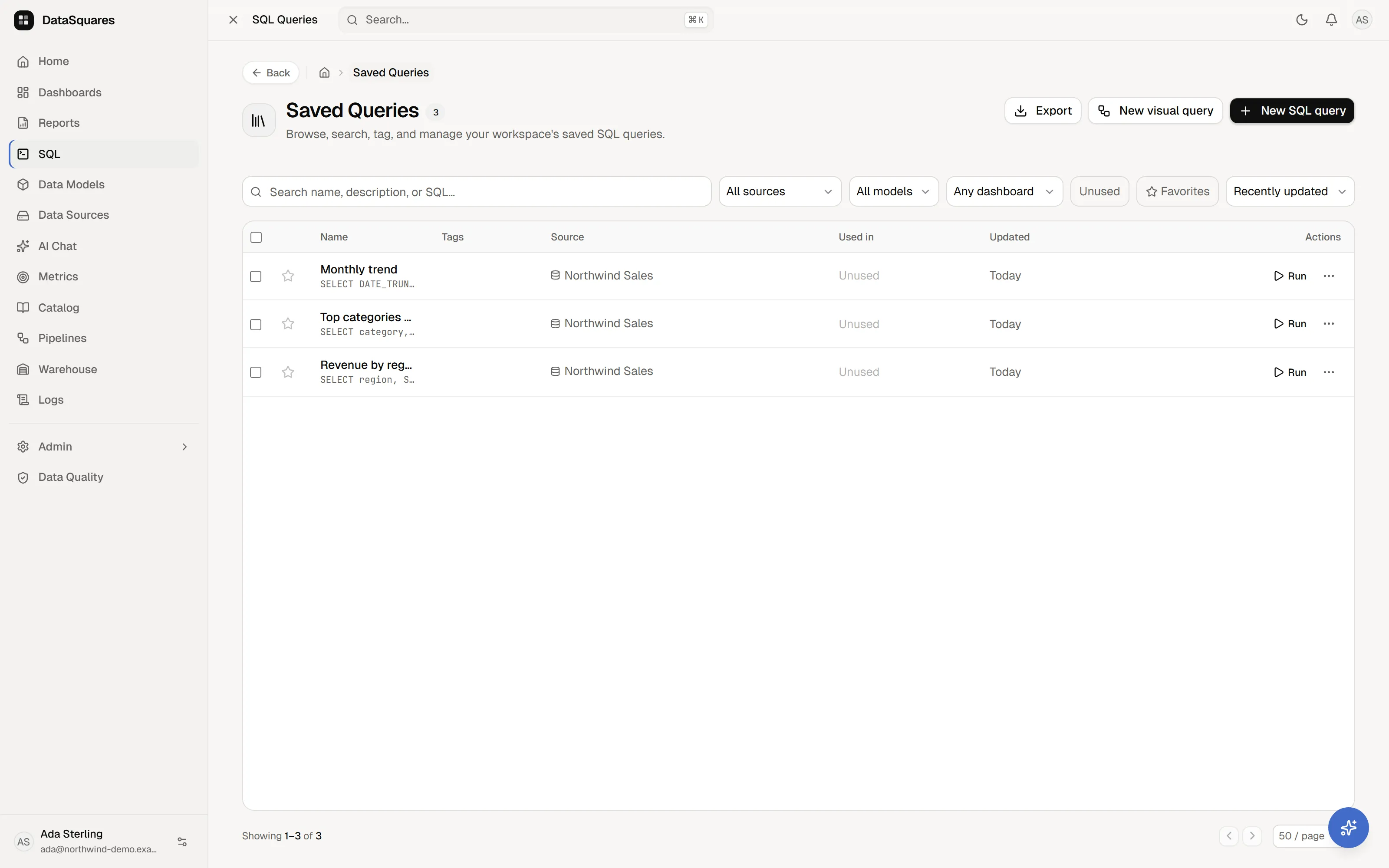
Every query worth running twice belongs in the Saved Queries library: a workspace-wide, searchable catalog of SQL with its source binding, model binding, tags, and dashboard dependency tracking.
What’s in a saved query
Section titled “What’s in a saved query”Each saved query maintains:
- Identity & metadata: Query name, description, tags, and a favorite star.
- SQL buffer & binding: The SQL statement, its bound data source, and optional data model binding.
- Visual steps: Queries created in the visual query builder store their step DAG (
builder_steps) alongside compiled SQL for full round-trip editing. - Usage lineage: Real-time tracking of which dashboard cards depend on the query.
Authoring entries
Section titled “Authoring entries”From the top-right of the Saved Queries page:
- New SQL query: Opens a clean Monaco workspace in the SQL editor.
- New visual query: Opens the canvas in the visual query builder to build a query from visual steps.
Browsing and filtering
Section titled “Browsing and filtering”The library is a rich, responsive table with URL-synchronized state for bookmarking and sharing:
- Full-text search: Search across query names, descriptions, and raw SQL text.
- Tag filtering: Multi-select tags from your workspace tag registry.
- Source & model filters: Filter queries bound to specific data sources or semantic data models.
- Dashboard & Unused filters: Filter by a specific dashboard or click Unused to isolate queries not referenced by any dashboard card (ideal for catalog cleanup).
- Favorites toggle: Click Favorites to filter for starred queries.
- Sorting & pagination: Sort by Recently updated, Name (A–Z), or Newest. Page sizes support 25, 50, or 100 rows per page.
Per-query actions
Section titled “Per-query actions”Each row and detail drawer provides:
- Run: Opens the SQL editor and executes the query immediately (
/sql/new?q=<id>&run=1). - Open in SQL editor: Opens the query in a dedicated editor tab without running.
- Open in visual builder: Available for queries with visual steps, reopening the node canvas.
- Add to dashboard: Drops the query directly onto a dashboard as a live SQL card.
- Import to DataSquares: Materializes the query result into the managed warehouse (when the Warehouse feature is licensed).
- Duplicate: Clones the query while preserving SQL, description, source binding, and model binding.
- Copy SQL: Copies the query’s SQL text to the clipboard.
- Favorite: Toggles query favorite status.
- Delete: Confirms deletion. If the query is currently used by dashboard cards, deletion is protected (surfacing the dependent dashboards and requiring explicit confirmation).
Bulk management & CSV export
Section titled “Bulk management & CSV export”- Bulk actions: Multi-select queries on the current page to apply workspace tags or perform batch deletion. In-use queries powering active dashboard cards are safely preserved during bulk deletion.
- CSV export: Click Export on the header to download a CSV summary of the current filtered list (including names, descriptions, sources, tags, usage, timestamps, and SQL).
The detail drawer
Section titled “The detail drawer”Clicking any query row opens the side drawer:
- SQL preview & copy: View formatted SQL and copy it with one click.
- Tag editor: Add or remove workspace tags.
- Name & description editor: Update query labels and documentation.
- Governance lineage (“Used in N dashboards”): Lists every dashboard card powered by this query with direct navigation links, ensuring you know exactly what will be impacted before making changes.
Queries on dashboards
Section titled “Queries on dashboards”Add to dashboard (or the canvas’s SQL insert card) binds the saved query to a dashboard card:
- The card re-queries the source directly on refresh or parameter change.
- Central management ensures that updating a saved query propagates to all linked dashboard cards.
Related
Section titled “Related”- SQL editor — Monaco-based SQL workspace with draft recovery and AI.
- Visual query builder — step-by-step query construction without SQL.
- Canvas basics — using SQL cards on dashboard canvases.
- Warehouse — importing saved queries into managed datasets.